Dynamic pricing with metal spot prices
How to use the Spot prices page and spot-linking: every piece's metal cost computed live from weight, purity, and the current market, so prices stay current without a single bulk update.
6 min read · Updated May 05 2026
Spot-linked pricing is the core of what makes Pennyweight different from a spreadsheet. It's also the part that takes the longest to internalize, because it asks you to give up a habit most jewelers have practiced for years: typing the cost of metal directly into a price sheet.
This article walks through what spot-linking actually does, why typing a cost in is the wrong default, and the small decisions that determine whether a material is spot-linked or fixed.
What "spot" means
The spot price of a precious metal is what it costs on the open market right now. Gold spot, silver spot, platinum spot: these are the wholesale-market reference prices that move every minute the markets are open. Reuters quotes them. Refiners use them. Bullion dealers price off them.
Your supplier doesn't sell you gold at spot. They sell at spot plus a premium for refining, fabrication, and their margin. That premium tends to be roughly stable. The spot itself moves constantly.
So when gold "moves 4% overnight," what moved was the spot price. Your supplier's price moved roughly in lockstep. The piece you priced last week using last week's spot is now priced wrong.
What Pennyweight does with spot
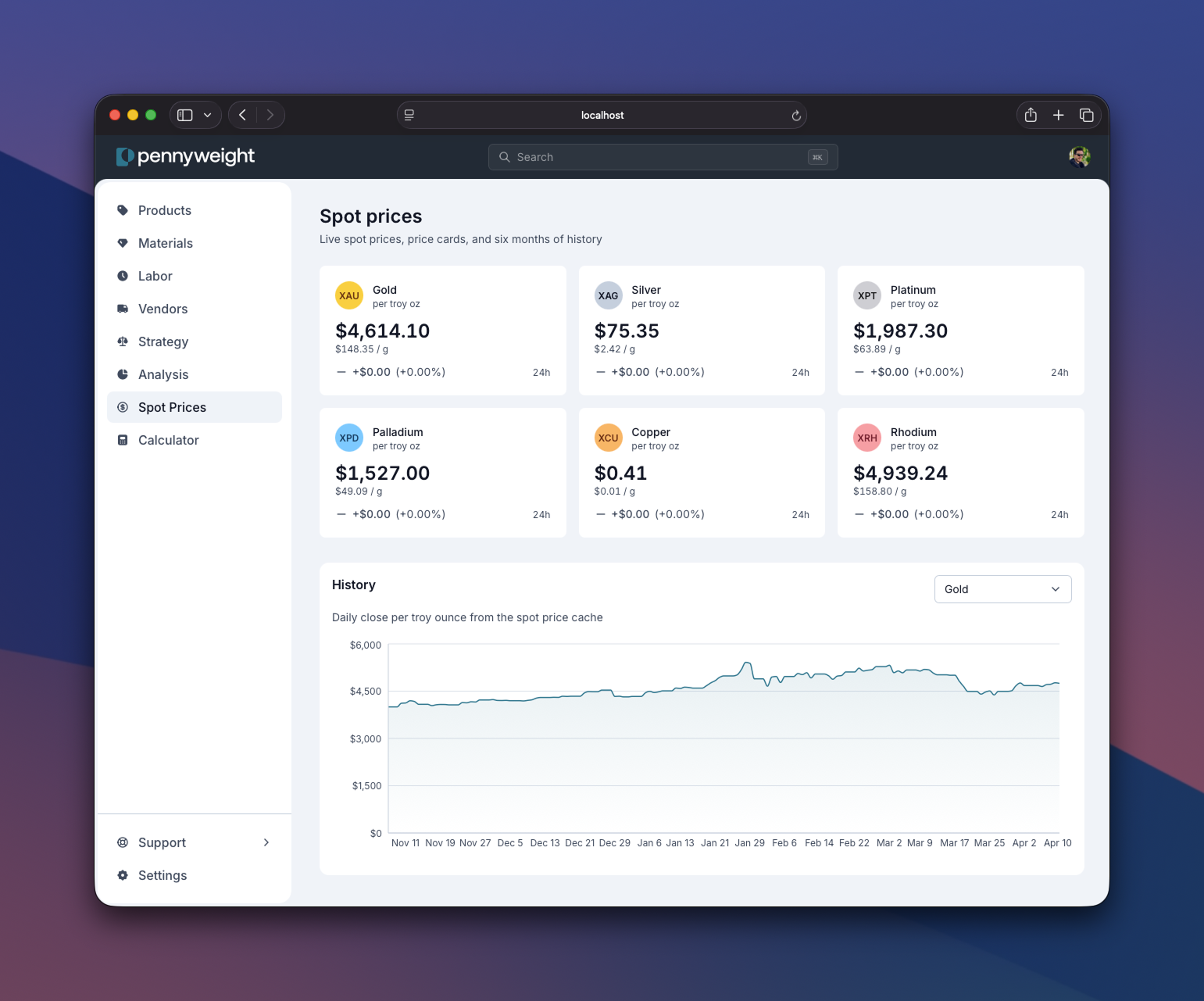
Pennyweight pulls live spot prices from the metals market every few hours and caches them. When you look at any piece, the metal cost on that piece is computed in real time:
metal cost = weight × purity × current spot price per gram
Three things to notice:
- The cost is not stored. It does not exist as a number in the database. It's computed every time you render the piece.
- All three inputs can change independently. If you change the weight (you re-weighed the piece), or the purity (you switched from 14K to 18K), or the spot moves (the market did its thing), the price updates.
- Purity is a multiplier, not a percentage. 14K gold is 0.5833 pure. So 4 grams of 14K at $90/g spot = 4 × 0.5833 × $90 = $210, not $360. Pennyweight handles the karat math for you.
What "spot-linked" looks like on a material
When you create a metal material, you're asked for a metal type (gold, silver, platinum, etc.) and a purity (24K, 18K, 14K, sterling, etc.). The moment you set both, Pennyweight infers that you want this material spot-linked. You stop seeing a "cost per unit" input. Instead, you see a live-computed cost-per-gram that updates with the market.
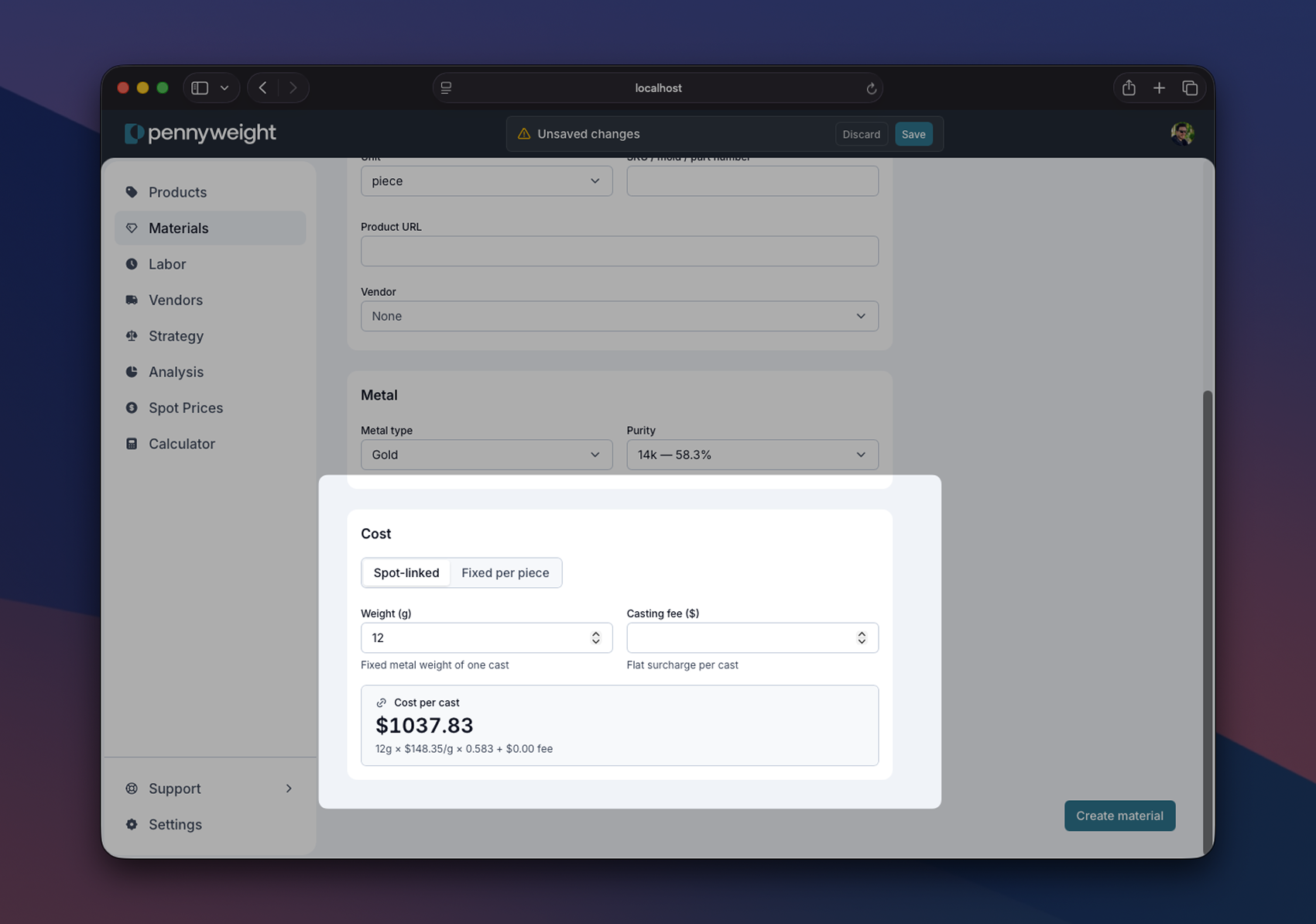
In your materials library and your products table, spot-linked materials are marked with a small chain-link icon. That icon is shorthand for "this material's cost moves with the market."
When to use a fixed cost instead
Not everything should be spot-linked. The rule of thumb: if the cost actually moves with the metal market, link it. If it doesn't, type the price in.
- A 14K gold sheet from your refiner: spot-linked. The price you pay tracks the market.
- Findings, jump rings, ear posts: usually fixed. You buy a bag for $18; that price doesn't swing with gold spot.
- Castings: it depends. If the casting house bills you for metal at spot plus a fabrication fee, it's spot-linked (with a casting fee on top). If they sell finished castings at a flat price per piece, it's fixed.
- Gemstones: fixed in almost all cases. The exception is a parcel-style purchase where you're charged per gram of finished stone, which is rare.
- Packaging: always fixed.
Why this matters when you sell wholesale
If you wholesale, the case for spot-linking is even stronger. Wholesale margins are thinner. Keystone is 50% of retail, which on a metal-heavy piece can be a 15% margin. A 4% swing in gold on a piece priced last month against last month's spot can wipe out half that margin.
Spot-linked pieces hold their margin through the swing. Fixed-cost pieces don't.
What this unlocks
- You stop being afraid of metal swings. The market does what it wants. Your retail and wholesale prices update with it.
- Edits propagate. Changing a casting's weight in the library reprices every ring that uses it. Changing a material's metal type from 14K to 18K reprices every piece that uses it.
- Reverse pricing works. "I want to sell this for $450. What's the most material and labor I can put into it?" That math runs backward from a current spot. Use the Calculator to try it.
A practical first step
Add one metal material to your library (the gold or silver you use most often) with the right metal type and purity. Set it as spot-linked.
Add one product that uses it. Set the weight. Look at the price.
Now imagine gold runs 5%. Don't change anything. Refresh the page tomorrow morning. The price will be different. That's the entire idea.
Sign up to read the rest of this guide
The rest of this guide (when to use spot-linked vs fixed costs, the wholesale margin math that makes spot-linking essential at scale, and what it unlocks across your catalog) is included free with any Pennyweight account.
Where to go from here
- Materials: the library/instance distinction that makes spot-linking work in the first place. Spot-linking attaches to materials, not to individual pieces.
- Strategy: the four levers (labor rate, markup, overhead, margin target) that turn a spot-linked cost into a finished retail price.
- Channels: once your retail price tracks the metal market, every channel does too. Here's how those percentages compose.