How to use sales channels effectively
How to use the Sales channels section of Strategy: wholesale, consignment, distributor, and custom channels priced as percentages of retail, with margin floors that warn before you ship at a loss.
7 min read · Updated May 05 2026
Once you start selling through more than one channel (your own site plus a retailer plus a gallery), pricing gets complicated. A piece that nets you $300 at retail might net $120 at wholesale and $90 through a distributor. And every time gold moves, all four numbers move.
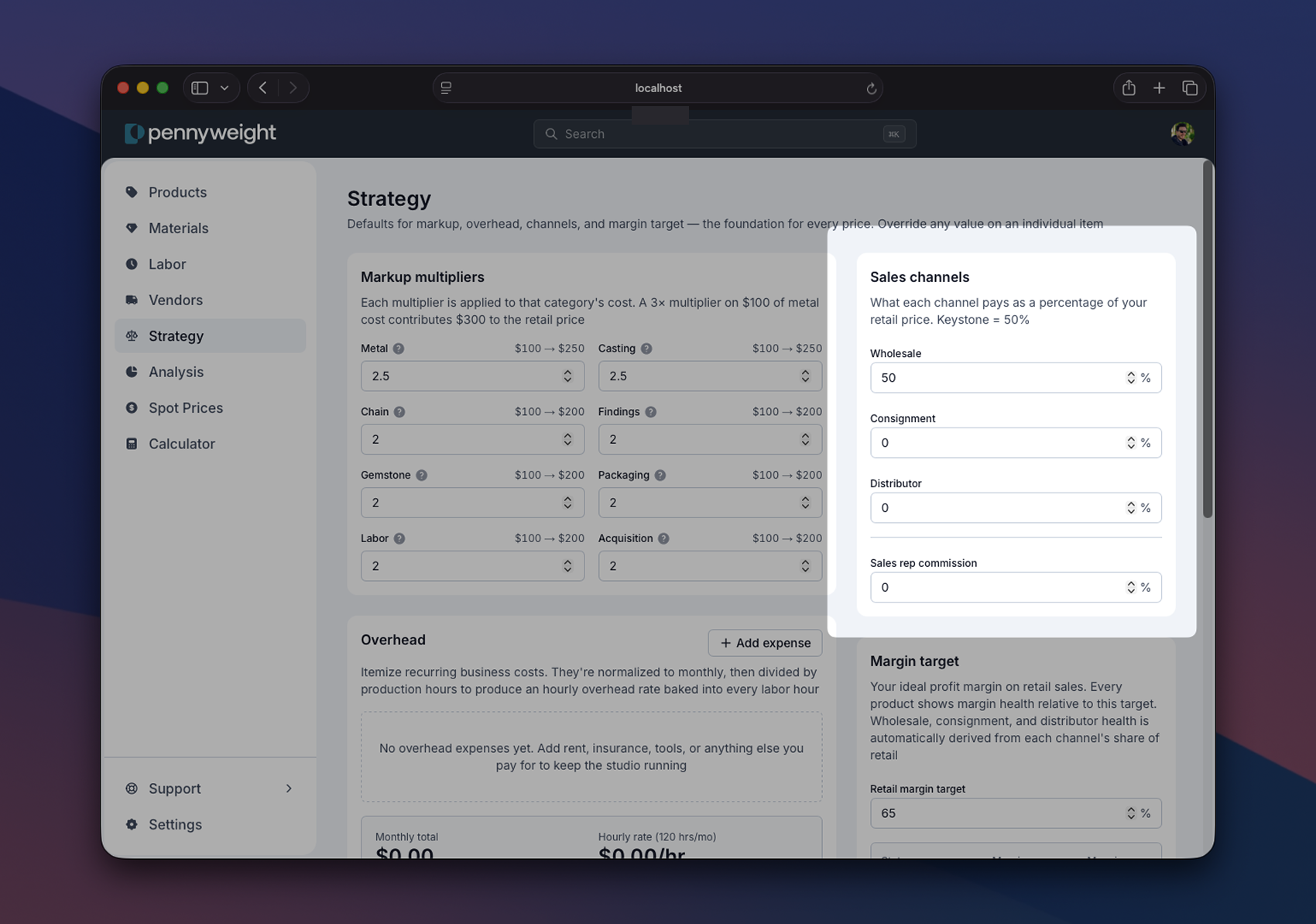
This is where most spreadsheets fall apart. Pennyweight handles it with a simple model: every channel is a percentage of retail. Set the percentages once, and every piece in your catalog is priced for every channel automatically.
The keystone model
Most of the jewelry industry runs on what's called keystone pricing: stores buy from makers at 50% of the suggested retail price. The store doubles it to get back to retail. Customer pays retail. Store keeps the difference.
Wholesale isn't always exactly 50%. Different retailers, categories, and relationships push it to 45% or 55%, but 50% is the gravitational center. Pennyweight defaults wholesale to 50%; adjust if your relationships are different.
Consignment is different. The maker keeps the piece in the store on consignment, and when it sells, the store takes a cut (typically 30–40%) and the maker keeps the rest (60–70%). Consignment is structurally better for the maker than wholesale on a per-sale basis (you keep more of the retail) but worse on cash flow, since you're holding the inventory until it sells.
Distributors are the deepest discount. They buy in volume, mark up, and resell to retailers who mark up again. Distributor pricing is typically 30–40% of retail. You're trading margin for volume.
What this looks like in practice
Take a ring that retails at $400.
- Retail: $400. You keep what's left after cost.
- Wholesale at 50%: Store buys at $200. They retail it for $400. You make whatever margin remains after your cost, usually thin.
- Consignment at 65% (35% to the store): Piece sells for $400 in the store, store keeps $140, you keep $260.
- Distributor at 35%: Distributor buys at $140, marks up, sells to retailers at $200, retailers retail at $400. You make whatever margin remains after cost.
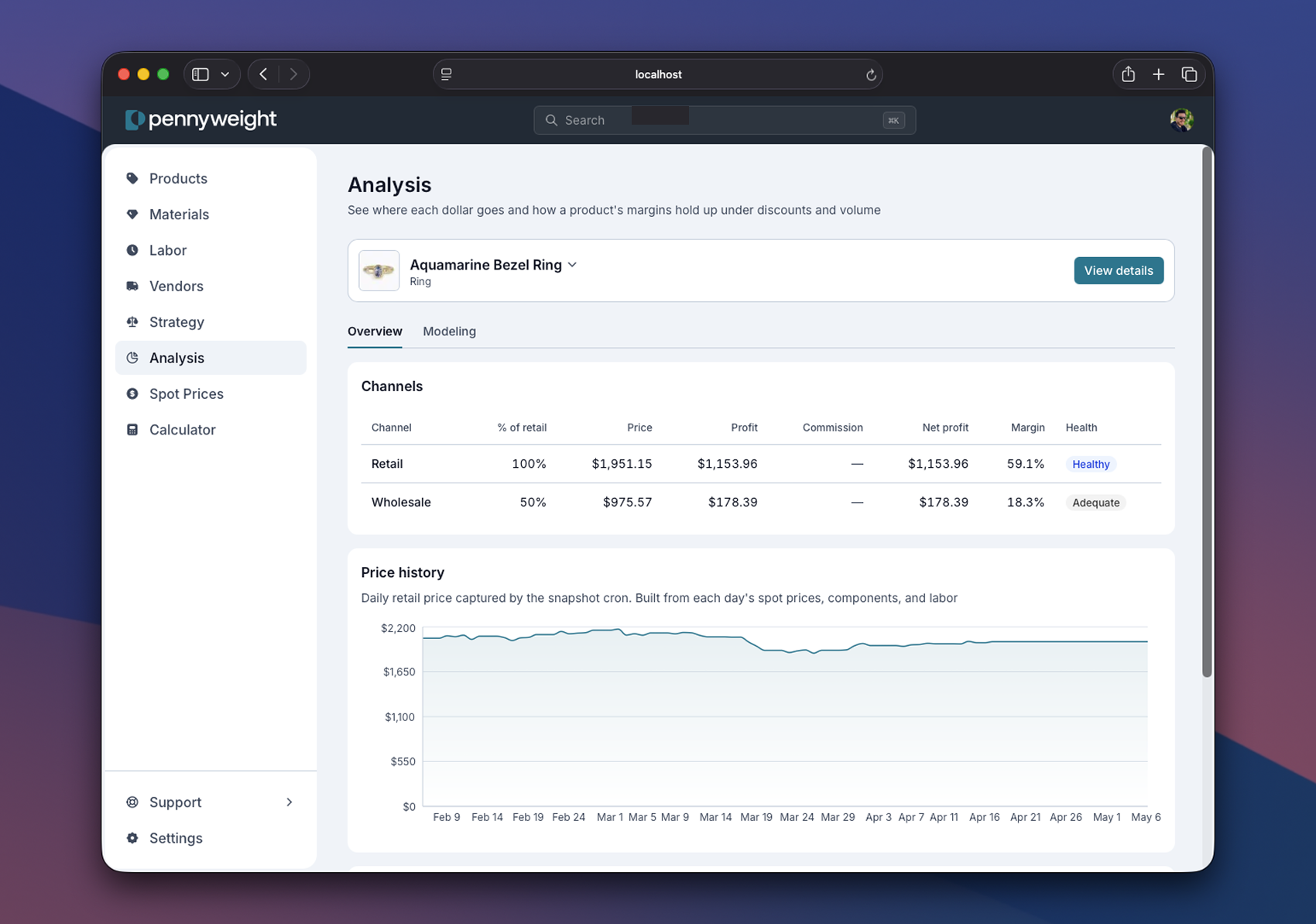
Pennyweight shows you all four numbers on every piece in the Analysis page. You can see at a glance which channels are healthy on a piece and which channels are losing money.
Sales rep commission
If you work with a sales rep, you set their commission percentage on the strategy page. The default is 10%. Pennyweight subtracts this from your wholesale profit after the wholesale margin, so the math is:
your take = (wholesale price - cost) × (1 - rep commission)
A piece that costs $80 to make and wholesales at $200 with a 10% rep commission:
- Wholesale price: $200
- Profit before commission: $120
- Rep commission: $12
- Your take: $108
This matters because rep relationships only work when you can see the actual take, not the gross. The Analysis page shows wholesale-with-rep separately so you can compare.
Margin floors
Here's where Pennyweight gets opinionated. Each channel has built-in margin floors that prevent you from accidentally pricing yourself into a loss.
- Retail: healthy at 40%+ margin, adequate at 25–40%, thin below 25%, loss-making below 0%.
- Wholesale: healthy at 20%+ margin, adequate at 10–20%, thin below 10%, loss-making below 0%.
- Consignment: healthy at 30%+ margin, adequate at 15–30%, thin below 15%.
- Distributor: healthy at 10%+ margin, adequate at 5–10%, thin below 5%.
The wholesale floors are looser than retail because keystone math is structurally tighter. A 20% wholesale margin corresponds to roughly a 60% retail margin, which is healthy by retail standards. The floors are calibrated so "healthy" means the same thing across channels even though the absolute percentages are different.
If a piece falls below the floor in any channel, Pennyweight flags it. You'll see a warning on the piece's analysis view: this channel can't cover its cost at your current markup.
When channels lose money
The most common reason a piece loses money in wholesale is labor-heavy work with low metal content. A finely-fabricated silver brooch with 4 hours of bench time has very little metal and a lot of labor. Wholesale at 50% works fine on metal-heavy pieces because the metal markup absorbs the discount. On labor-heavy pieces, even a 3× labor markup minus a 50% wholesale discount leaves only a 1.5× effective multiplier on the labor portion. Once overhead and packaging pass through, that piece can dip below the wholesale margin floor.
The fix is usually one of three things:
- Don't sell that piece at wholesale. Some pieces are retail-only. Pennyweight lets you override channels per-piece.
- Raise the labor markup. A 3.5× labor markup gives you headroom to absorb the wholesale discount on labor-heavy work.
- Raise the retail price. If the market supports it, the wholesale follows automatically.
Pennyweight's Analysis page surfaces this with the break-even simulator. It tells you the minimum markup that lets every channel clear margin. Use it before you commit a piece to a catalog.
Custom channels
If you sell through a channel Pennyweight doesn't model out of the box (a co-op, a holiday market with a different fee structure, a private-label arrangement), define it as a custom percentage. Same model: set the percentage of retail, Pennyweight computes every piece in that channel. No new spreadsheet required.
A practical first step
Before your first wholesale order, set the wholesale percentage to whatever your store relationships actually are. Then open one labor-heavy piece in your catalog and look at its wholesale margin. If it's red, decide now whether to fix the markup, raise the retail, or exclude the piece. Don't find out the answer when an invoice is already out.
Sign up to read the rest of this guide
The rest of this guide (sales rep commission math, channel-specific margin floors, what to do when channels lose money, custom channels, and the practical first step before your first wholesale order) is included free with any Pennyweight account.
Where to go from here
- Strategy: the labor rate, markup, and margin floors that channel percentages compose with. If your wholesale margin is too thin, the fix usually lives here, not in the channel page.
- Spot prices: why every channel reprices automatically when gold moves. Channel pricing only stays current because the underlying retail price is computed, not stored.
- Materials: the library/instance model that makes "change one input, every channel updates" actually work.