Building your materials library
How to use the Materials library: your reusable vocabulary of metals, gemstones, findings, and packaging that every product references. The library grows as you build pieces.
6 min read · Updated May 05 2026
Your materials library is the reusable list of every metal, gemstone, finding, casting, and packaging item you buy. Define each one once, then reference it from every piece that uses it. Change a material's price in the library and every product reprices automatically.
The library
Open Materials in the sidebar. Everything here is a reusable definition. A spool of 14K yellow gold sheet. A 3.2g cast shank. A package of 1.5mm round CZ. A box of polishing cloths.
Each material has a category (metal, casting, chain, finding, gemstone, or packaging) and a unit (grams, pennyweight, troy ounces, inches, feet, milliliters, carats, or pieces). The unit is how you'll consume the material when you build a piece. A sheet of gold is consumed by the gram. A length of chain is consumed by the foot. A bag of jump rings is consumed by the piece.
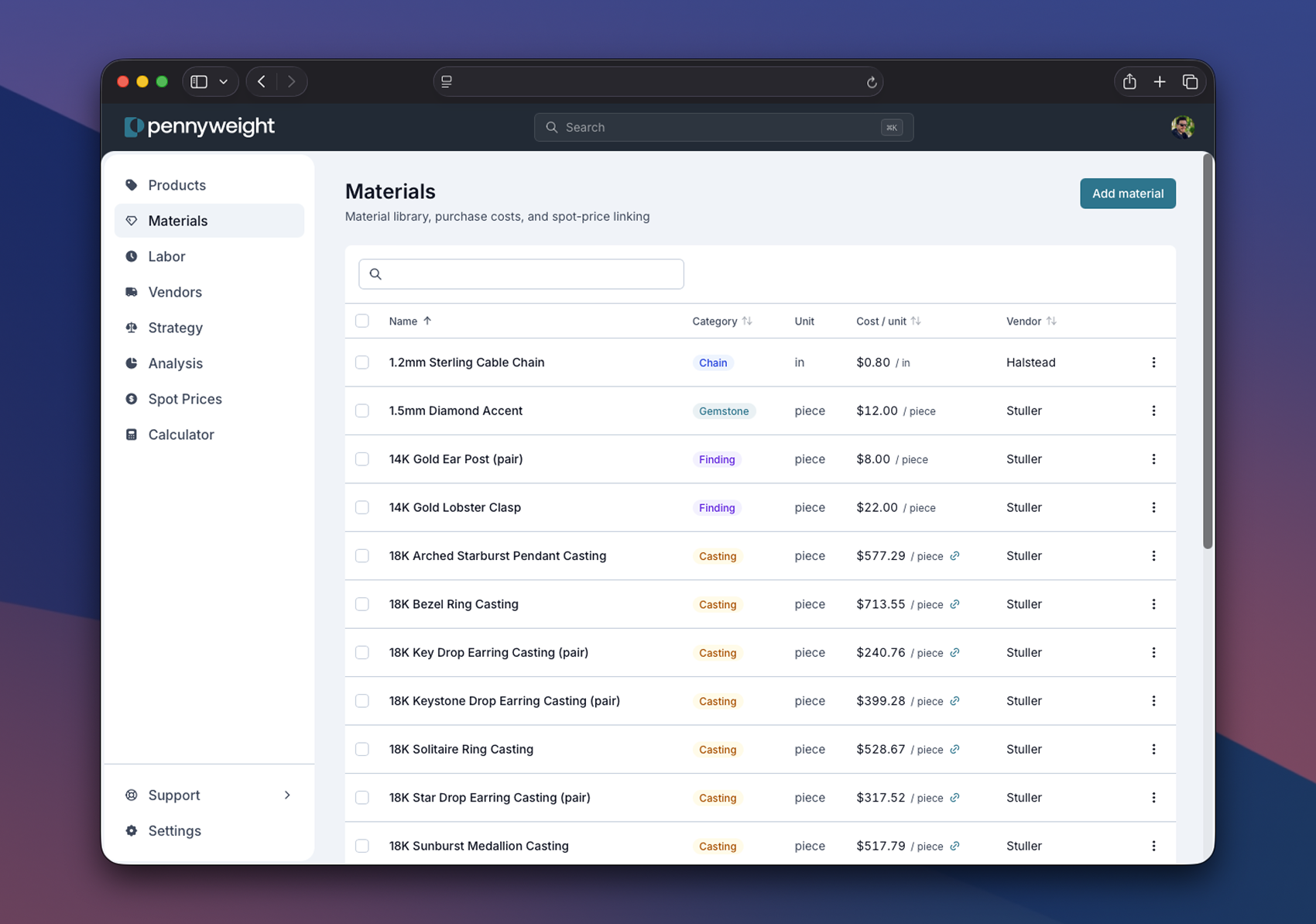
Some materials carry a fixed cost. A box of polishing cloths costs $24 for 50, and that doesn't change whether gold is at $80/g or $90/g. Type the cost in once.
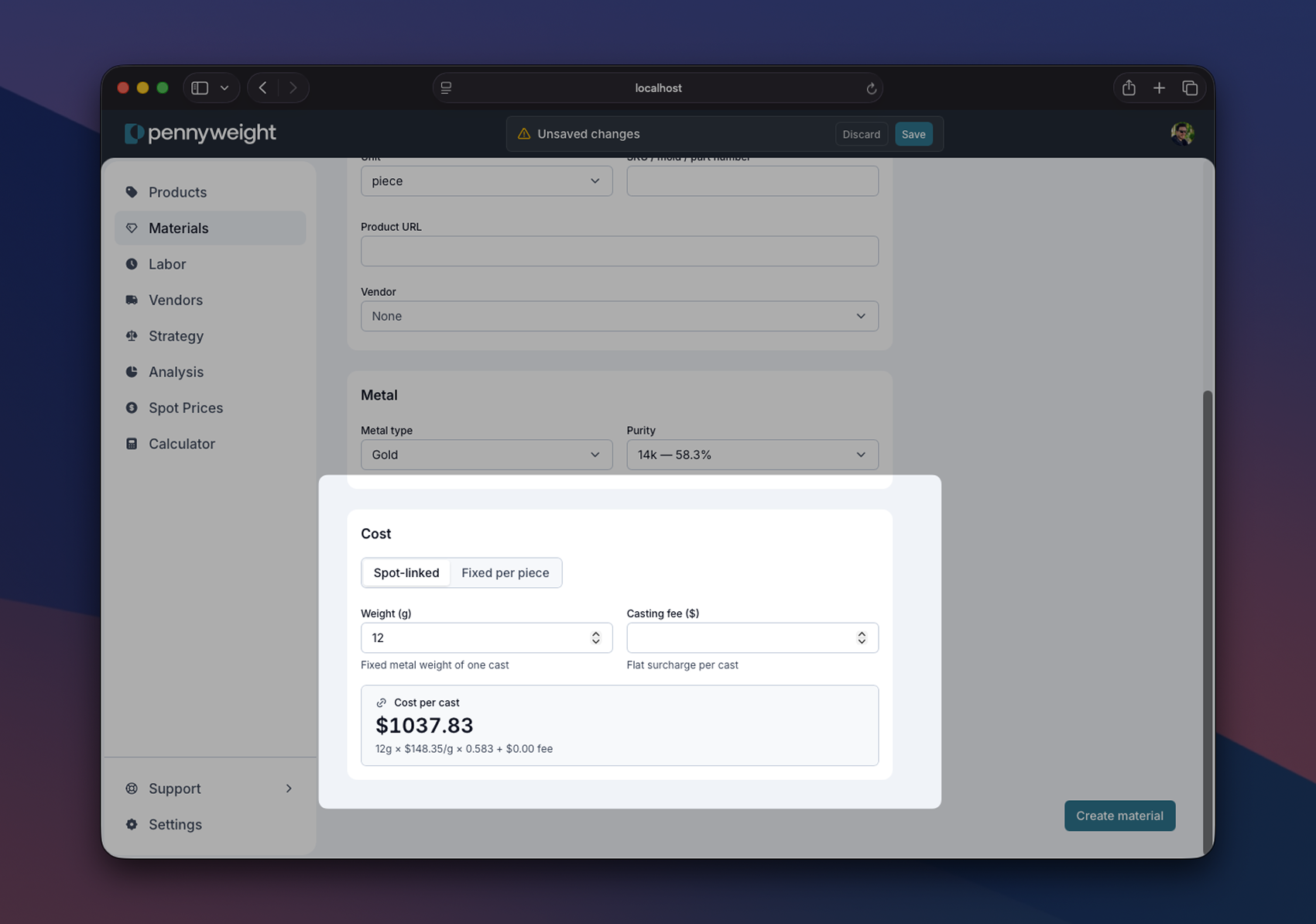
Other materials, the precious metals, are spot-linked. Their cost is not a number you type. It's a function of the live metal market: weight × purity × current spot. When you mark a metal material as spot-linked (by giving it a metal type and a purity), Pennyweight stops asking you for a cost. The cost is derived, every time, from whatever spot is right now.
This can be a subtle mental shift. Describe the material correctly and Pennyweight will figure out what it costs.
The piece
Now open a product. Scroll to the Components section. This is where you list what's in this specific piece.
A component is a reference to a material from your library, plus a quantity. "This ring uses 4.2 grams of 14K yellow gold sheet, one cast shank, two 2mm CZs, and one polishing cloth." Four components. Each one points at a row in your materials library.
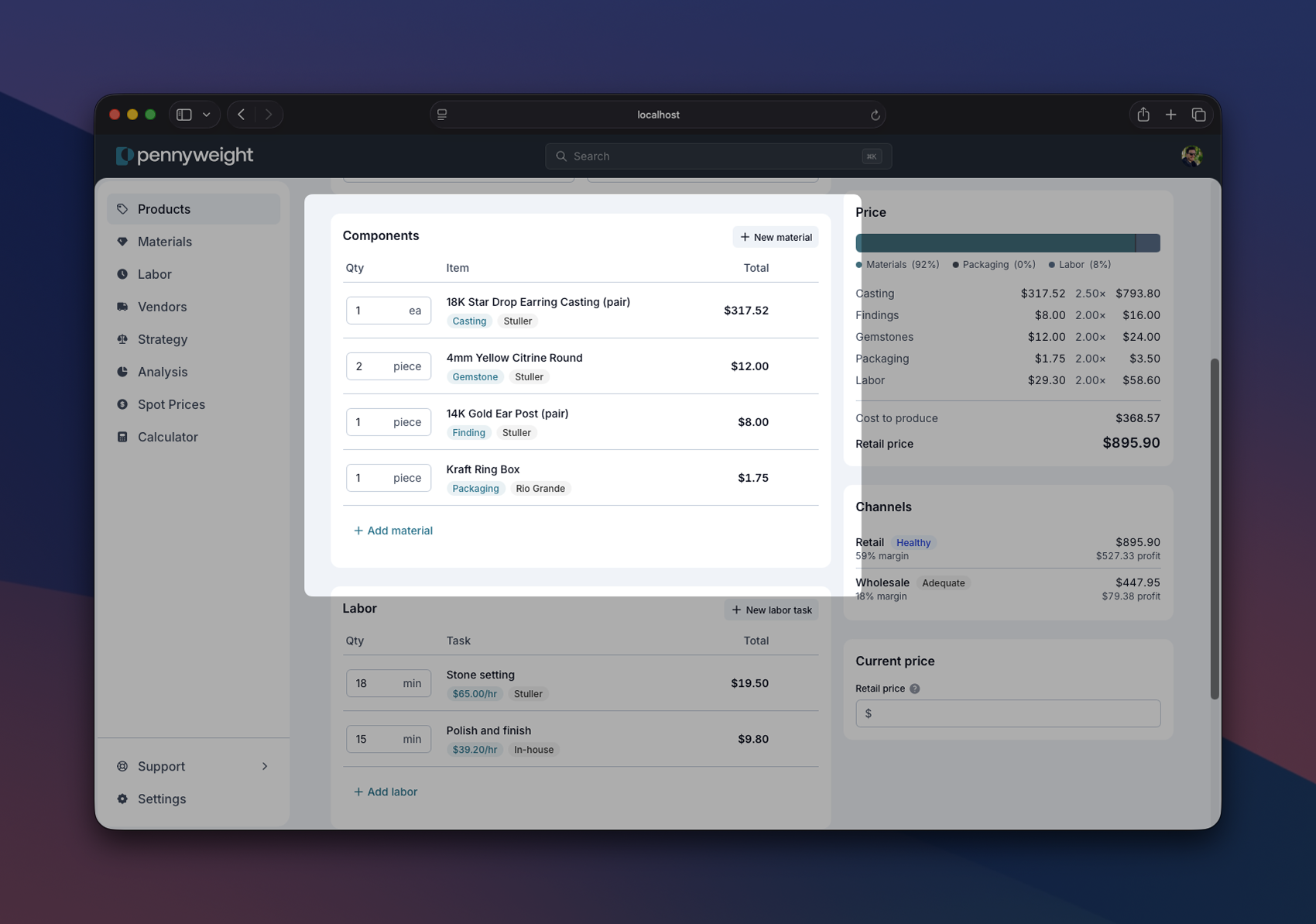
The cost of a component is computed: quantity × current cost-per-unit of the referenced material. For spot-linked materials, that means quantity × weight × purity × current spot price. You don't see a stored number. You see a live computation.
Castings work the same way. A cast shank has a known weight, metal type, and purity stored on the library entry. When you add the casting to a ring, you only specify quantity. The metal cost is computed from the casting's stored weight × purity × spot.
Variable-length materials: chain, wire, sheet stock
Some materials don't come in tidy unit-of-one quantities. You buy chain by the foot. You buy wire by the spool. You buy sheet stock by the square inch. And you consume them in whatever amount a specific piece requires.
There are three reasonable ways to model these in your library, and the right answer depends on how you actually buy and use the material.
- Per-unit (per-inch, per-gram, per-foot). Track the raw material once, with a cost per inch or per gram. BOMs read "16 × box chain (per inch)" or "1.4 × 14K yellow gold sheet (per gram)." Best when you cut to length often, want clean cost math on variable-length pieces, and buy in bulk. One library entry, infinite flexibility.
- Per-piece (finished sizes). Track each common finished length as its own material: "16-inch box chain, finished," "18-inch box chain, finished." BOM rows read "1 × 16-inch box chain." Simpler per-item entry, more library maintenance. Best when you sell standardized lengths and don't cut-to-length often.
- Hybrid. Track the raw chain per-inch as one material, and keep finished-chain entries as separate materials whose cost is the inch-level chain plus finishing labor and findings. More library complexity, but you get unit-cost precision on the raw material and one-click application on common lengths.
The same tradeoff applies to wire, sheet, solder, and findings sold by weight: anything you buy as a continuous quantity and consume in variable amounts per piece. Start with per-unit. It's the most flexible and the one you can always retrofit later.
Consumables and findings: what to track, what to lump
Every piece uses a long tail of small things: flux, pickle, sandpaper, polishing compound, jump rings, ear posts, clasps. Individually they're under a dollar; collectively, across hundreds of pieces, they add up to real money. The question is never whether to account for them. It's how much precision is worth the bookkeeping.
A working framework, ordered by cost-per-piece:
- Under ~$0.50/piece, bake into overhead. Flux, pickle, sandpaper, polishing compound. Don't track per-piece. Make sure your monthly overhead reflects what you actually spend on shop supplies, and let the per-hour overhead rate carry it.
- $0.50–$3.00/piece, flat fee material line. A "Standard findings, earrings" material at $2.00 covers 2× ear posts + 2× ear backs across a typical mix. You're averaging, not itemizing. One library entry, applied to every relevant piece.
- Over $3.00/piece, real material entries. A $4.00 magnetic clasp or a hand-fabricated bezel cup deserves its own material in the library, with its own cost. The spread is wide enough that averaging hides the truth.
Where the line falls is your call. The thresholds above are starting points, not rules. The test is whether the precision changes a pricing decision. If swapping a flat fee for itemized entries wouldn't shift the retail price by more than a few dollars, the flat fee is fine.
Naming materials so you can find them
A library that grows past about 20 entries gets hard to scan if names are inconsistent. A naming convention you can stick to is worth more than any specific format.
Listings show only the name and a category badge. Metal type, karat, and color don't appear as columns, and findings don't have a metal field at all. If you want that info visible at a glance, it has to live in the name.
Two patterns work. Pick one and apply it to every entry.
Metal-first (recommended)
Lead with karat, color, and metal, then the form factor and a dimension when sizes vary.
Schema: [Karat] [Color] [Metal] [Form factor] [Dimension]
Sorts by metal, so everything in a given karat clusters together. Useful when you think "I'm working in 14K today, what do I have?"
- 14K Yellow Gold Casting Grain
- 14K Yellow Gold Sheet 24ga
- 14K Yellow Gold Wire 1mm
- 14K White Gold Bezel Cup 6mm
- Sterling Silver Casting Grain
- Sterling Silver Wire 1mm
- Sterling Silver Earring Post
- Gold-Filled Earring Post
Form-factor-first
Lead with form factor and dimension, then a trailing clause for karat, color, and metal.
Schema: [Form factor] [Dimension], [Karat] [Color] [Metal]
Sorts by form factor, so everything in a given shape clusters together. Useful when you think about your bench by what's in each drawer.
- Casting Grain, 14K Yellow Gold
- Casting Grain, Sterling Silver
- Sheet 24ga, 14K Yellow Gold
- Wire 1mm, 14K Yellow Gold
- Wire 1mm, Sterling Silver
- Earring Post, Sterling Silver
- Earring Post, Gold-Filled
Both patterns scan and sort cleanly. The mistake is using both at once: half your sheet entries lead
with the metal, the other half lead with Sheet 24ga,, and the table won't cluster either way. Pick
one and apply it to every new entry.
For non-metal materials (gemstones, packaging, polishing cloths), the same care applies. Lead with
what distinguishes them most: stone type and cut for gems, function for packaging. CZ Round 2mm,
Lab Sapphire 4mm, Velvet Pouch Small, Polishing Cloth.
Common naming slips
A few patterns that look fine on entry three and break by entry thirty.
Mixed capitalization on karat marks. Pick one and use it everywhere. The table sorts
case-sensitively, and 14k lands in a different place than 14K.
- 14k Yellow Gold Sheet
- 14K yellow gold sheet
- 14kt Yellow Gold Sheet
- 14K Yellow Gold Sheet
Missing karat or alloy. A piece that lists "Gold Sheet" tells you nothing about cost. The same name across 10K, 14K, and 18K is three different prices.
- Gold Sheet
- Yellow Gold Wire
- 14K Yellow Gold Sheet
- 18K Yellow Gold Wire 1mm
Vague dimensions instead of specs. "Small" is relative; 1mm is a fact. When you come back in six months you'll remember the millimeter, not which wire you once thought of as small.
- Round Wire (small)
- Round Wire (medium)
- 14K Yellow Gold Wire 1mm
- 14K Yellow Gold Wire 2mm
Inconsistent dimension format. Pick one convention (1mm or 1 mm, 24ga or 24g) and use it
everywhere. The table sorts character by character, so 1mm and 1 mm won't cluster.
- Wire 1mm
- Wire 1 mm
- Wire 1.0mm
- Wire 1mm
- Wire 1.5mm
- Wire 2mm
Inconsistent ordering of facets. If one entry leads with the alloy and the next leads with the shape, neither pattern sorts the way you expect.
- Jump Ring 4mm Sterling
- Sterling Jump Ring 6mm
- 4mm Jump Ring, 14K
- Sterling Silver Jump Ring 4mm
- Sterling Silver Jump Ring 6mm
- 14K Yellow Gold Jump Ring 4mm
The materials table is searchable and sortable, but a consistent name turns scanning into reading.
Sign up to read the rest of this guide
The rest of this guide (modeling chain, wire, and sheet stock; the consumables-and-findings tradeoffs by cost-per-piece; and naming conventions that scale past 50 entries) is included free with any Pennyweight account.
Where to go from here
- Spot prices: why metal materials should be spot-linked and not have a typed cost. The library/instance model is what makes spot-linking apply to every piece automatically.
- Strategy: the markup and margin levers that sit on top of materials and components.
- Channels: once your materials library is right, channel pricing is mostly a percentage problem.